
IPTV Smarter: What It Means, What the App Does, and How to Use It Safely
People often search this phrase when they want a simple, TV-like interface for watching internet-based television. In practice, they’re usually talking about a player app (an interface) rather than a content provider. This guide explains what that means, how setup typically works, and the checks that prevent common problems.
1) What People Mean by This Search
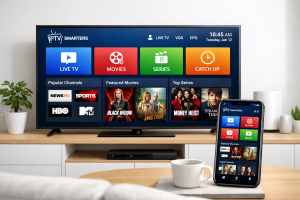
Most of the time, this keyword is shorthand for “a Smarters-style IPTV player” — an app that helps you organise and play streams in a clean interface (Live TV, Movies, Series, EPG). It’s popular because it feels closer to a cable/satellite experience than basic playlist players.
The important thing to understand is that the app is a front end: it displays what your IPTV source provides. If the source is slow, inconsistent, or misconfigured, the app can’t magically fix that — but it can make playback easier when the underlying stream is stable.
2) Player vs Provider: The Key Difference
A player is the software that loads your channel list, shows categories, and plays video. A provider/source is the service that actually supplies the stream URLs, catalogue, EPG data, and access rules.
- Player apps focus on navigation, playback controls, favourites, and guide layout.
- Providers/sources determine availability, uptime, bitrate, regional performance, and licensing.
3) How Setup Typically Works
Setup is usually straightforward. The exact steps vary by app version and the access method used by your service, but the flow is broadly the same:
- Install the player on your device (TV box, phone, tablet, smart TV, or PC).
- Choose a login method (credentials or playlist details).
- Enter the information provided by your service/source.
- Let the app load categories (Live TV / VOD / Series) and the programme guide if supported.
- Adjust playback settings for stability (hardware decoding, stream format, buffering options if available).
If you’re building a multi-device household setup, keep it consistent: set up one “main” device in the living room and mirror the same profile on a second device for backup.
Helpful internal pages: iptv-uk.shop home and support/contact.
4) Features That Matter Day-to-Day
People often get distracted by feature lists. In real usage, a few features do most of the work:
- EPG / TV guide: helps you browse live content like a traditional TV schedule (quality depends on the source).
- Search + favourites: saves time if you regularly watch the same categories or channels.
- Profiles: handy for families using one device (different favourites and watch history).
- Playback controls: subtitles/audio tracks where available, aspect ratio controls, and quick resume.
- Category organisation: a clean layout beats “thousands of channels” if half of them are poorly organised.
5) Supported Devices (What Works Best)
These apps are commonly used across:
- Android TV / Google TV boxes (often the most flexible for IPTV players)
- Amazon Fire TV devices (popular for living-room setups)
- Smartphones and tablets (quick access and travel use)
- PC / laptop (great for multitasking and bigger screens)
- Some smart TVs (availability depends on the TV’s app store and OS)
If you want fewer headaches, a dedicated streaming device tends to outperform older built-in smart TV hardware over time.
6) Stability Tips for Smoother Streaming
“Buffering” is rarely one single issue. It’s usually a chain: Wi-Fi quality, evening congestion, device decoding, and stream reliability. These checks help:
- Use Ethernet when possible (or position the router closer for stronger Wi-Fi).
- Enable hardware decoding in the app if your device supports it.
- Close heavy background apps (downloads, cloud sync spikes, many browser tabs).
- Test at peak time (evenings/live events) because that’s when weak infrastructure shows.
- Keep expectations realistic: not every channel will be flawless 24/7 in every region.
If you’re comparing options, do a simple two-day test: one quiet time slot (morning/afternoon) and one peak slot (evening). A reliable experience at peak time is the real “quality” indicator.
7) Common Mistakes to Avoid
- Assuming the app provides channels: it’s an interface, not a catalogue.
- Choosing based on channel count: consistency and organisation matter more than inflated numbers.
- Ignoring device limits: old TVs/boxes may struggle with higher bitrate streams.
- Skipping a real test: always verify performance during the hours you actually watch.
- Not saving login details securely: keep credentials private and avoid sharing widely.
8) Legal Awareness (Plain English)
IPTV is a technology — like any other internet video delivery method. Whether a specific stream is lawful depends on licensing and distribution rights. A player app doesn’t change that; it only displays what it’s given.
9) Resources
Internal links
External resources (neutral / authority)
- Google Search Central (documentation)
- Ofcom (UK communications regulator)
- Cloudflare: What is streaming?
- Wikipedia: Internet Protocol television
- WIPO: Copyright overview